
Your view
Look
AURA moves slowly. Pause it under AURA, or choose Still here. If your device asks for less motion, AURA starts still. These choices stay on this device.
Neuroinclusive AI learning infrastructure
Education should
adapt. Not you.
Our mission is to change the future of education. Your course. Your pace. AURA beside you.
AURA
Alongside the work
One connected space: Dashboard Word Canvas Learning tools AI collaboration ledger Your courses: import your own files now.
The ambition is one connected learning environment. The dashboard provides orientation, Word Canvas supports writing, learning tools support understanding, and the AI Collaboration Ledger makes recorded assistance visible. AURA accompanies the work. File imports and direct LMS integrations are distinct capabilities.
THE LEARNING EXPERIENCE / DESIGNED TOUR
These are real screens from a sample course, not a live student’s work, and some of what they show is still in development.
One connected learning world.
ORIENT
Find your next step.
Your dashboard brings the course and the work ahead into view.
1 of 4 · Dashboard
Read the tour instead
Find your next step. Your dashboard brings the course and the work ahead into view.
Make room for your ideas. Bring the brief and your own writing together in Word Canvas.
Keep your thinking visible. Record declared AI assistance and reflect on the decisions you made.
Return, without the guilt. AURA’s intended role: help you reorient and choose a manageable next step.
Recognition & filing details
The award was made at the UNSW Peter Farrell Cup finals on 18 September 2026. It is not the overall PFC prize. The provisional patent application is recorded in the counsel handoff; it is not a granted patent. ANSF is a working draft, not an adopted Australian Standard.
The product
One place to find
your way forward.
One assessment, four moments: understand what it asks, write it with your next step beside you, get help on your terms, and come back to where you were. These are real screens from a sample course, not a live student’s work, and some of what they show is still in development.
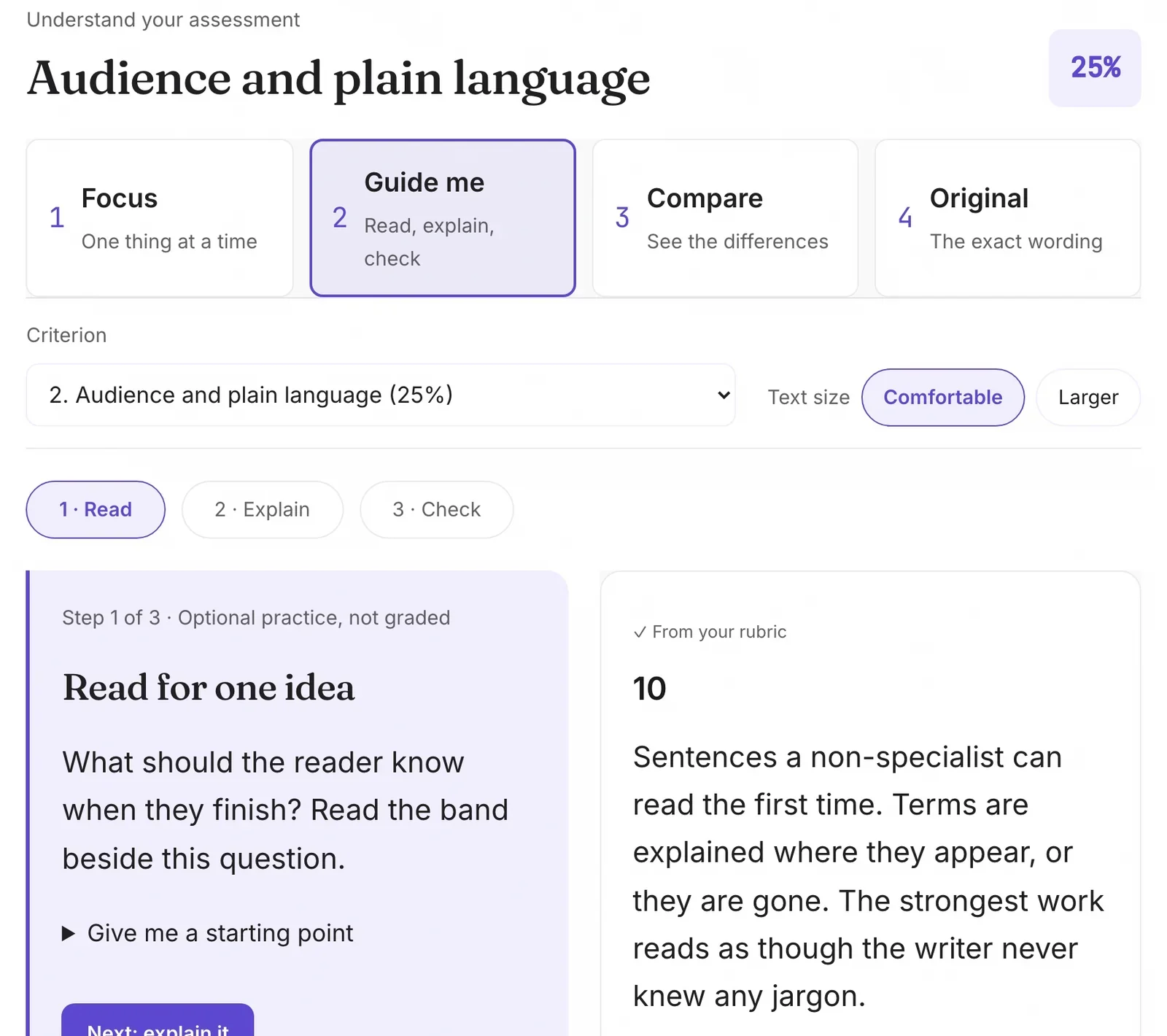
Understand what the task is asking.
Read one rubric criterion at a time, four ways: one thing at a time, guided steps, a side-by-side compare, or the exact wording. You choose the criterion. Nothing is chosen for you.
Write with your next step beside you.
Your brief becomes named parts with word counts. The first step for the part you are on sits beside your writing, never inside it, and you choose how much help you want. (The new writing screen design, on a made-up task.) See it up close

Guided support you control.
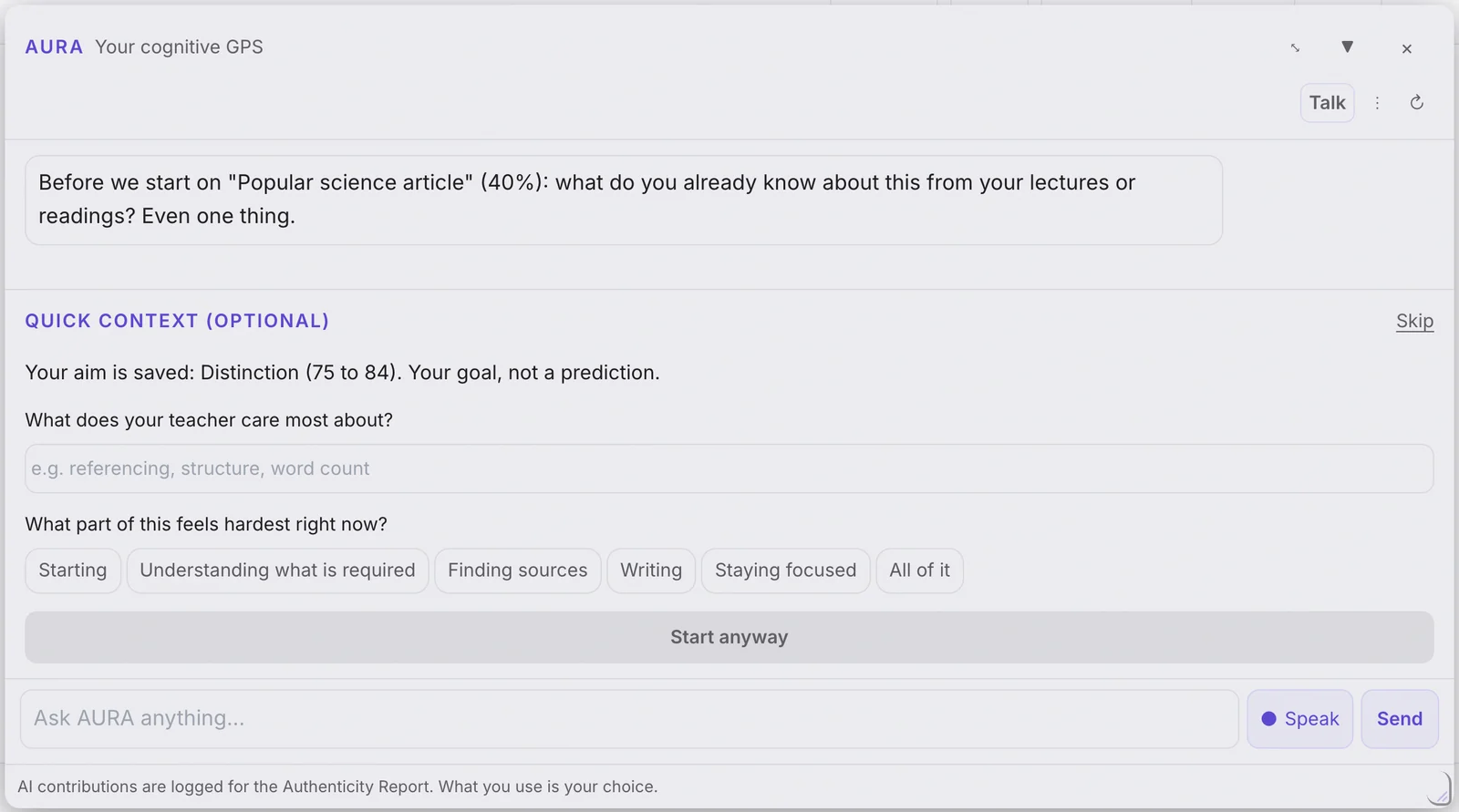
AURA starts by asking what you already know. Every extra question is optional and can be skipped. What you use is your choice, and AI contributions are logged for your own report. (In the 8 October demo build.)
Come back to the exact place.
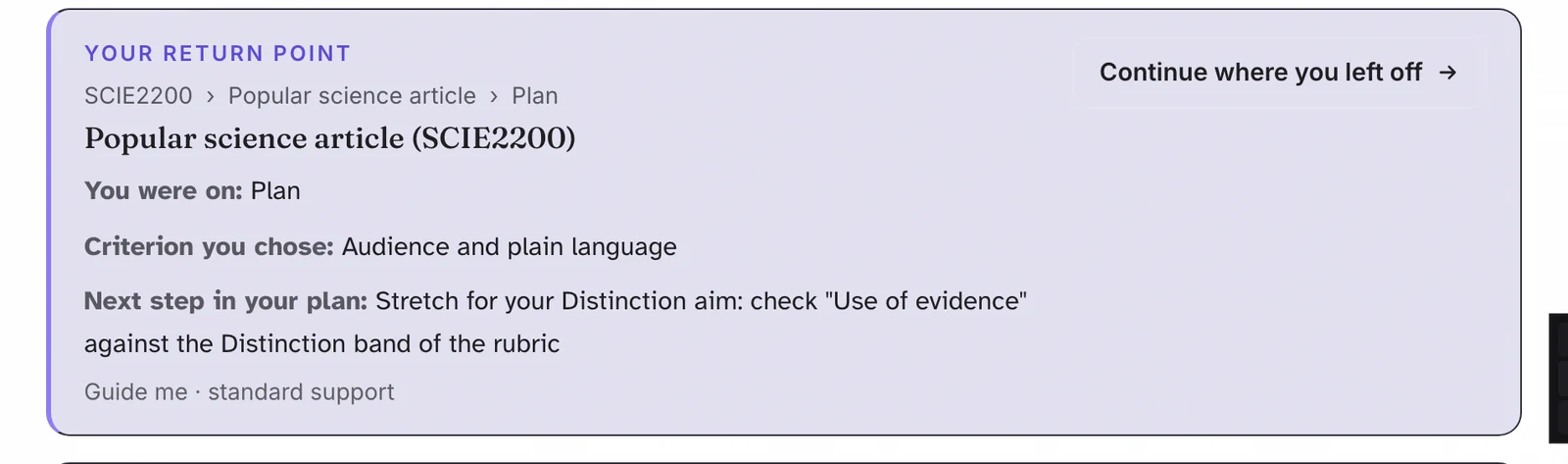
Home names the course, the task, the step you left it on, the criterion you chose and the next step in your plan. No timers, no “you missed” messages.
Understand what the task is asking. Read one rubric criterion at a time, four ways: one thing at a time, guided steps, a side-by-side compare, or the exact wording. You choose the criterion. Nothing is chosen for you.
Write with your next step beside you. Your brief becomes named parts with word counts. The first step for the part you are on sits beside your writing, never inside it, and you choose how much help you want. (The new writing screen design, on a made-up task.)
Guided support you control. AURA starts by asking what you already know. Every extra question is optional and can be skipped. What you use is your choice, and AI contributions are logged for your own report. (In the 8 October demo build.)
Come back to the exact place. Home names the course, the task, the step you left it on, the criterion you chose and the next step in your plan. No timers, no “you missed” messages.
About these screens
The screens show a sample course so no real student work appears. Some of what you see is still in development.
Personalised learning
Same goal.
More ways to get there.
Change the view. Keep the meaning.
Support should respond to your task, preferences and capacity today. You stay in control.
READ IT
Learning environments
Explore one barrier to participation. Find evidence that helps explain it. Propose a response that creates another way into the same learning goal.
Sample learning task: explore a barrier to participation, find supporting evidence, and propose a response. This can appear as a short paragraph, a sequence of steps or a map of connections. The learning goal remains the same.
Light · Dark · Paper
Reading space · motion choice · written alternatives
Coming next: five desk designs
Momentum · Reading · Predictable · Map · Quiet
Five desk designs in development. Explore the presentation choices here.
A week with AURA
Different moments.
Connected support.
Choose a moment. See the support change.
Where do I begin?
Let’s find what the task is asking.
Start with one question, then look at the material together.
First document: Start with one question, then look at the material together.
Everything at once: Make the pile visible, then choose a manageable next action.
Blank page: A small prompt supports your thinking without supplying the answer.
Midway through: Return to the brief and your own reasoning.
Low energy: Support should respond to capacity, not demand constant productivity.
Too much: A quiet view, a pause or a route to human support.
Coming back: Re-entry without a guilt message or a broken streak.
Time is short: Prioritise, simplify the plan or prepare to ask for help.
Read this another way
The story follows eight moments: a first document, competing tasks, a blank page, checking progress, low energy, overwhelm, returning after absence, and limited time. These scenes illustrate the intended support; they are not a claim of measured outcomes.
Pro-AI. Pro-learning.
Use AI.
Keep your thinking visible.
External AI belongs in the conversation. Bring its use into the learning record, with your decisions and reflections alongside it.
AI you choose
Name the tool and purpose.
Your judgement
Explain what you used or changed.
A clearer record
Check the course’s AI-use requirements.
The current external-AI pathway supports learner declaration. The richer proposed pathway brings selected external conversations and learner reflection together in the workspace.
Mine. Mixed. Model.
Planned ways to distinguish your contribution, collaboration and model output.
Beside your LMS. With your institution.
Connected learning.
Clear boundaries.
Your course stays authoritative.
Bring materials you have permission to use. Keep the brief and assessment requirements beside the work.
Bring your own course files straight in.
UNIVERSITY IP & DATA HANDLING
Earn trust through the details.
Ownership, permissions, provider processing and retention must be clear for each institutional pilot.
- Permission to use course materials
- Visible AI and data-processing boundaries
- Agreed access, retention and review
Proposed institutional reporting: de-identified, aggregated findings only.
Institutional assurance work in progressUniversal Design for Learning 3.0
Design for difference.
Open more possibilities.
Inclusive design can remove barriers for a wider range of students. UDL 3.0 guides our approach to learner agency.
More ways to
connect and begin.
Relevance, choice, belonging and support when starting is hard.
More ways to
make sense of it.
Words, diagrams and guided demonstrations of the same idea.
More ways to
develop and show learning.
Flexible tools within the learning goal and course requirements.
Our UDL design commitment
CAST’s guidelines inform this design; they do not certify or endorse Simplifii. We aim to reduce barriers for all learners and will test where the experience helps, where it does not, and what needs to change.
Explore CAST UDL Guidelines 3.0 ↗Regulate. Reach out. Return.
Reset belongs
in the system.
Less pressure when it is too much.
A welcoming place to begin again.
Support direction · availability varies by feature
We can start small.
No streak to repair. No guilt to carry.
The person comes before the task. This design direction includes a quieter view, pauses, routes to human support and a gentle return after absence. It does not replace professional or emergency support.
Who we’re building for
Different learners.
A shared future.
Our ambition spans school, TAFE, university, research and home learning, with educators alongside.
Intended audience · readiness and support must be established for each setting.
FOR STUDENTS
Free through your uni or a sponsor.
When your university, school or a sponsor partner covers you, you never pay. A plan for students on their own comes after the pilot. See the three ways in
FOR INSTITUTIONS
Pilot first.
A paid pilot to understand usefulness, cost and fit before a wider licence.
ANSF / OUR RESEARCH DIRECTION
From a better workspace
to better systems.
We’re developing the Australian Neuroinclusive Systems Framework: a testable approach to better systems, starting with education.
Working draft · standards pathway planned · not an adopted Australian Standard
The ambition beyond the product
Learning tools, AI, software, workplaces and public services can all be examined for barriers to agency, orientation, cognitive load and sensory control. ANSF is a proposed framework to make those questions testable. Its value and any future standards status must be established through evidence and the relevant formal process.
What we’re exploring
Interest. Rhythm.
Room to focus.
Spark
Start with what makes you curious.
Rhythm
Make room for effort and rest.
Zone
Explore how focus could be protected.
Spark explores using interests to make learning relevant. Rhythm explores sessions and breaks without streak pressure. Zone explores protecting focus. All three are future directions; Zone is exploratory.
OUR MISSION
Change the future
of education.
A learner should have more than one way in. An educator should be able to support difference. An institution should be able to explore AI with clarity.
A COMPANY, NOT ONLY AN APP
Product.
Education.
Research.
Better design.
One connected ambition. Our commitment: build and test with the people it is for.
Early evidence. Clear context.
The beginning
of something bigger.
students, academics and university staff the founder has spoken with about what gets in the way
universities in conversation, across Australia and Aotearoa New Zealand
people tested version 1, our set of separate study tools
people have reviewed version 2, the one connected product, so far. Their feedback was positive. The concerns they raised were AI use, privacy, energy use and cost.
Be one of our
first 100 testers.
User testing for version 2 starts soon. The first 100 testers get a free seat.
Three ways in
Help shape the
future of education.
Choose the route that fits you. Each one goes to a real page or a real inbox.
For students
Join the founding cohort.
Free in the pilot. Add your name for the first cohort. Sign-in opens with an access code.
For universities and schools
Start with a pilot.
A fixed-scope paid pilot to test usefulness, cost and fit before any wider licence.
For contributors
Help build it.
Bring your skills to the build, the research or the design. The team page sets out the roles and how to start.
Something else? Email aaron@simplifii.com.au
What is available, and what comes next?
External tool and purpose declaration is implemented in source. Transcript import and the three-lane experience are proposed and not connected to the live frontend in the reviewed source. The ledger records captured or declared assistance; it does not monitor every external AI conversation, establish authorship or guarantee institutional acceptance.
How we describe protection accurately
Our intended protection of university intellectual property is a design commitment, not an established end-to-end guarantee. Current source guidance documents processing through external AI providers. We therefore cannot claim that course material never reaches an outside model. A pilot needs an agreed, evidenced account of each data flow.